FAQs (Frequently Asked Questions)
IP Addresses & IP Address Problems
It is helpful to think about phones as a comparison. Each phone has a specific phone number. When you make a phone call, you enter the phone number of the person you want to talk to, and when that person receives your call, your phone number shows up. Each phone has a phone number, and two phone numbers are required for a two-way call (each person is speaking to the other). In many cases of two-way communication, you can think of each Ethernet port as a phone with its own number. Each Ethernet port on the bossdevice has a unique number, its IP address. Each Ethernet port on other devices (the control computer, the amp, the TurboLink (if BrainVision), the computer running the EEG recording software, etc.) has a unique IP address. Sync2brain has already set the IP addresses for the two Ethernet ports on the bossdevice. Sync2brain has also already told the bossdevice which IP addresse it can communicate with on computers. However, sync2brain cannot pre-set the IP address on the control computer, or tell the control computer the bossdevice's IP address, so the user must set them so the bossdevice can communicate with the control computer. Similarly, the user needs to set the IP address that their amp will send data to. It gets a bit confusing when the user also needs to set IP addresses for their amps and other devices.
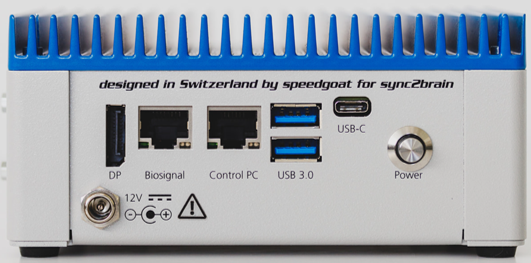
Control PC
The "Control PC" Ethernet port on the bossdevice is pre-set to "192.168.7.5". Therefore anything that wants to communicate with the "Control PC" Ethernet port on the bossdevice needs to know that IP address. In this case, the bossapp research wants to communicate with the "Control PC" port on the bossdevice. So, in the bossapp research, we enter "192.168.7.5" in the IP box on the top left.
This is two-way communication, so on the flip side, the bossdevice wants to communicate with the Control PC. Sync2brain has already set the bossdevice to expect an Ethernet port on a computer with the IP address "192.168.7.2" subnet mask "255.255.255.0". Therefore the user needs to set the Ethernet port on their computer to have that IP address. We have instructions on how to do this in the "Installation" page of this user guide. There are a few additional steps to prevent Windows from blocking or interrupting this communication also described on the "Installation" page.
Biosignal
The "Biosignal" Ethernet port on the bossdevice is pre-set to "192.168.200.255". This port is a bit different because it only needs to receive information in a specific format. It does not need to send information. The user just needs to tell whatever is sending the information to the "Biosignal" Ethernet port on the bossdevice what its IP address is and how it wants to receive information.
BrainProducts Users
For BrainProducts users, the "Biosignal" Ethernet port on the bossdevice receives this information from an Ethernet port on the TurboLink. In the TurboLink software, the "Biosignal" Ethernet port on the bossdevice is referred to as the "Data Client". Users should follow the set-up poster that came with the TurboLink and set the "Data Client" IP address to "192.168.200.255". Users should also set the "Data Client Rate" dropdown to 1000Hz and leave the "Packet rate" box unchecked.
Bittium Users
For Bittium users, the "Biosignal" Ethernet port on the bossdevice receives this information from the "Digital OUT" Ethernet port on the Main Unit. In the NeurOne Software, the "Biosignal" Ethernet port on the bossdevice is referred to as the "Target IP Address" in the "Digital Out Settings" pop-up after clicking "Enable Digital" in the "Real-Time Out" tab when making a protocol. Users should enter "192.168.200.255" for "Target IP Address", set the "Packet Frequency" to 1000, set the Target UDP Port to 25000, select "Send Triggers as a Channel" and leave all other boxes unchecked. A picture is included in these instructions in the "Installation" page of this user guide.
Non-bossdevice IP Addresses
Separate from the bossdevice and bossapp RESEARCH, the TurboLink (BrainVision) communicates with BrainVision Recorder through Ethernet ports and the NeurOne (Bittium) communicates with its recording software (also called NeurOne) through Ethernet ports. The idea is the same, the Ethernet port on the device has an IP address and the Ethernet port on the computer has an IP address. The devices expect a certain IP address on the computer with their software and the user needs to set it accordingly. Their are instructions in the respective guides and issues with these IP addresses should be addressed to the amplifier provider.
While it is not reccomended, some users run both the bossapp RESEARCH software and the amplifier recording software on the same computer. In these cases, two seperate Ethernet ports are needed on the same computer. One set to the IP address that the bossdevice expects and plugged into the bossdevice's "Control PC" Ethernet port and a second set to the IP address their amp requires and plugged into their amp. In these cases, it is helpful to rename the ports on your computer to "bossdevice" and "amp".
Ethernet Adapters
If your computer does not have an Ethernet port, or does not have enough Ethernet ports, you can use an adapter for the bossdevice without issue. If using a desktop with open PCIe slots, you can get a PCIe expansion card with Ethernet ports and install it on the motherboard. If using a laptop, or using a desktop but prefer not to install a PCIe card, USB to Ethernet adapters work just as well. There are many options on the market and many would work. We just recommend that the adapter is Gigabit100/1000Mbps. If USB, we reccomend at least USB 3.0, it does not matter if it's USB-C or USB-A.
Institutional IT Locks
If you are using a computer managed by an institution, it is likely that you do not have the permissions needed to set or change the IP address on your computer or transfer information through that address. If this is the case, reach out to your IT department. They may be able to adjust your permissions or set the IP address for you. If they are setting the IP for you, ensure that they allow the bossapp to access both "Private Networks" and "Public networks". We also recommend they open a PowerShell window with administrator right and execute the following command:
New-NetFirewallRule -DisplayName "bossdevice" -Direction Inbound -RemotePort 5505-5507,5510-5512,5515-5517 -Protocol UDP -Action Allow -Profile Any -RemoteAddress 192.168.7.5
TTLs, Triggers, & Markers
People tend to use these terms interchangeably. In many cases, TTLs, triggers, and markers function similarly. They are sent from one device to another to start or stop a process or to mark that it has started or stopped. But it can get confusing when different people use different terms for a specific action or when multiple terms are used for the same action. In this manual, we will use the term "Trigger" to refer to when the bossdevice has determined the criteria have been met to trigger whichever actions the user has set. We will use "Marker" only to refer to numeric 8-bit TTL codes being received or sent by the bossdevice. Finally, we will refer to binary TTL pulses as BNC or binary TTLs.
Binary/BNC TTLs
Binary TTLs are just digital outputs. They are either on or off and the user defines how long they are on when they are turned on. They are great for initiating a process such as getting the TMS machine to fire. Many auxiliary devices use binary TTLs. They are commonly sent through coaxal cables with BNC ports. The bossdevice has 4 binary TTL BNC ports.
BNC/Binary TTL Considerations
- The length of a TTL pulse can be very short. Some devices have a minimum length pulse and if that length is not met, the pulse is not received. If your device is not receiving the TTLs from the BNC ports on the bossdevice, try increasing their length.
- The bossdevice uses a standard 5V TTL and should not be used with other voltages.
8-bit TTLs
8-bit TTLs allow for numeric values from 1 to 255 to be sent and received. These are the marker values common to EEG research, stimulus display software, and much more. They are commonly sent through DB25 or DB15 ports and cables. Though many EEG systems and other devices require a custom or propriatary trigger cable with a different number of pins. If that is the case for your device, reach out to your device supplier to source the correct cable. The bossdevice has two DB25 ports. One for 8-bit TTLs to be sent and one for 8-bit TTLs to be received. Received 8-bit TTL markers can be used to start or stop the firing window, switch condition, and more.
8-bit TTLs use similar ports and cables to serial and other protocols. But 8-bit TTL is different from serial and serial ports and protocols cannot be used with the bossdevice. Serial port functions in task software are not compatible with the bossdevice.
Parallel Port/8-bit to USB adapters
While Psychological and Brain Sciences, Neuroimaging, and many similar fields still rely on 8-bit TTL markers through DB25 "parallel" ports, parallel ports are no longer included in computers. We rely on parallel port adapters and there are two options. If using a desktop with open PCIe expansion slots, you can purchase a PCIe parallel port expansion card and install it on your motherboard. Alternatively, you can get a USB to TTL adapter. Two common options are the USB2TTL8 Adapter from MilliKey and the MMBT-S Trigger Interface Box from NEUROSPEC.
Misleading parallel port adapters
There are many, cheap, USB to Parallel Port adapters available. However, they are designed for use with printers and not 8-bit TTL. They will not work with the bossdevice or for 8-bit markers in general. A good hint is if it is less than $100 or if it mentions "printer" anywhere, it is probably not going to work for 8-bit TTLs.